

Self-hosting Obsidian Vault with Retype


If you use Obsidian, chances are you’ve thought about publishing your vault online. Maybe it’s a personal digital garden, a team knowledge base, or project documentation. Obsidian Publish is a great option, and if you prefer to self-host and have full control over where your site is deployed, Retype is worth a look.
Retype transforms your existing Obsidian vault into a fast, beautiful, and fully self-hosted website with no migration required. You keep your files. You own your content. And with GitHub, Cloudflare, Netlify, or any web server, you can host your website for free.
Start With Markdown, Stay Organized
Most teams just want to write and update content without hassle. Markdown fits this need with plain text, easy to read, and easy to version. Editors like Obsidian build on this foundation with features like page linking, advanced components, and WYSIWYG editing.
With Markdown, there’s no weird file format, your docs stay portable, easy to back up, and free from vendor lock-in. Obsidian, like Retype, is offline-first. All documents remain stored as plain Markdown files on your device.
A Workflow That Actually Works
Here's where Retype elevates the entire workflow:
Obsidian gets you visual markdown editing and collaborative authoring. Your entire team can contribute without learning complex syntax.
Your content stays portable and future-proof. No vendor lock-in means you can migrate easily at any time. Git integration tracks every change and enables branch-based workflows for major updates.
Retype transforms your markdown into a fast-loading and optimized website.
Write in Obsidian, generate your website with Retype, and host anywhere for free with no recurring monthly fees. Host on GitHub, Cloudflare, Netlify, or your own website hosting.
Community Key
Read about the free Community key if hosting on GitHub Pages and unlock Pro features for your project.
Demo
To demonstrate the ease of getting a Markdown website up and running with Retype, let's try building the Obsidian Help documentation project itself.
Step 1 – Install Retype
You can have Retype installed within seconds using one of the following commands, depending on your package manager of choice:
npm install retypeapp --globalyarn global add retypeappdotnet tool install retypeapp --globalOr, see the full documentation for installing Retype.
Step 2 – Get Obsidian Help GitHub repository
View the Obsidian Help repository and clone the repo, or choose Open with GitHub Desktop, or Download ZIP.
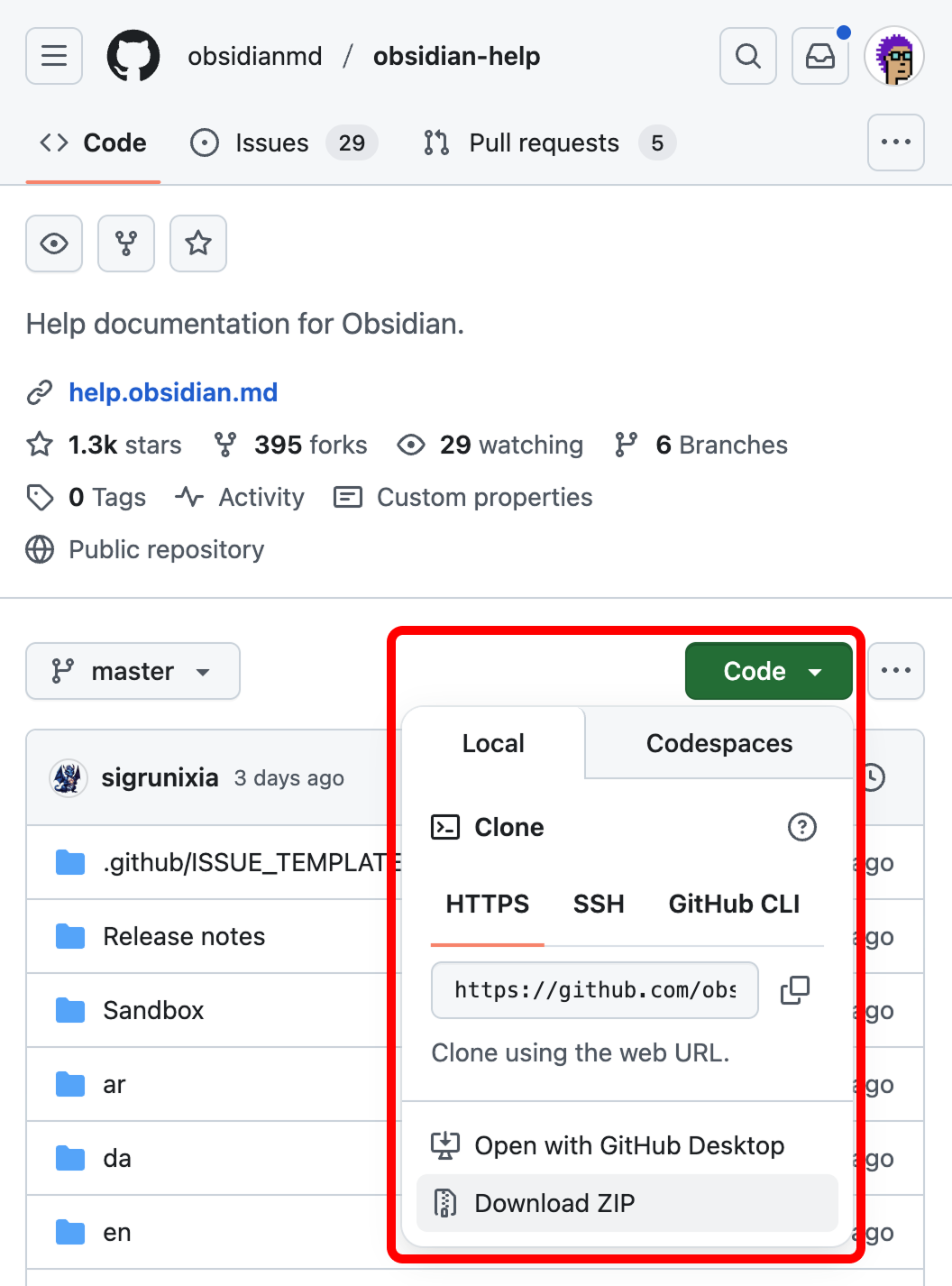
Once you have a copy locally, within your Terminal, move into the en sub-directory:
cd en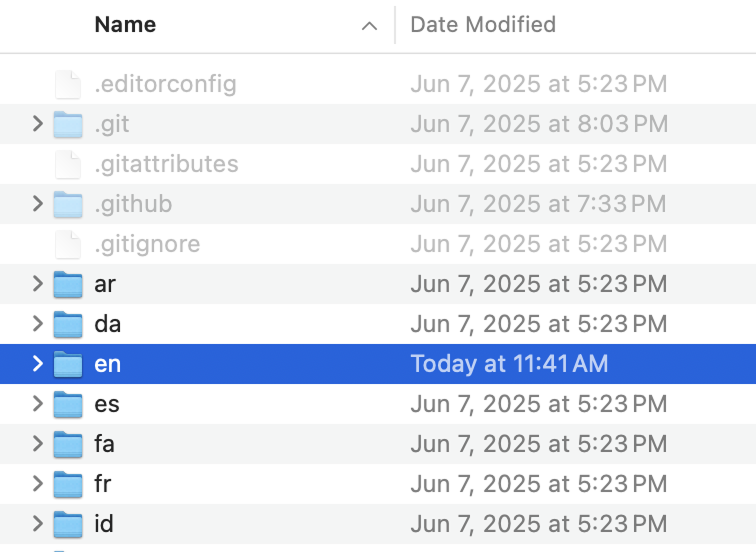
Step 3 – Start Retype
To start Retype, run the command retype start:
retype startWithin a few seconds, a new browser window will open and the website will load. We're going to customize the project in the next step...
Step 4 – Configure Retype
Within the root of the /en directory, you should see a new retype.yml file. The retype.yml file contains the Retype project settings and can be customized to your requirements.
Feel free to adjust and play with the settings in the retype.yml, or copy and paste the following settings that fit well with the Obsidian Help documentation:
# DISCLAIMER: THIS SITE DISPLAYS THE
# [OBSIDIAN HELP](HTTPS://GITHUB.COM/OBSIDIANMD/OBSIDIAN-HELP) DOCUMENTATION,
# WHICH IS © [OBSIDIAN](HTTPS://OBSIDIAN.MD/). THE CONTENT IS REPRODUCED HERE
# FOR INFORMATIONAL AND/OR EDUCATIONAL PURPOSES ONLY. WE MAKE NO CLAIM OF
# OWNERSHIP OVER THE MATERIAL; ALL RIGHTS ARE RESERVED BY OBSIDIAN. ANY USE
# BEYOND FAIR USE OR WITHOUT OBSIDIAN'S PERMISSION MAY BE SUBJECT TO COPYRIGHT LAW.
#
# THIS RETYPE.YML IS ONLY REQUIRED TO CONFIGURE AND BUILD THE DOCUMENTATION
# WEBSITE USING RETYPE (HTTPS://RETYPE.COM/) AS THE STATIC WEBSITE GENERATOR.
start:
# Start in Retype Pro trial mode:
pro: true
input: .
output: .retype
# See https://retype.com/community for a FREE
# GitHub community key on github.io
url: retypeapp.github.io/obsidian
edit:
repo: https://github.com/obsidianmd/obsidian-help/edit
base: /en
branch: master
nav:
icons:
mode: none
hub:
link: https://obsidian.md/
alt: Visit Obsidian
target: _blank
branding:
title: Obsidian
label: Help
logo: <svg alt="Obsidian" height="30" viewBox="-10 0 30 25" width="40" xmlns="http://www.w3.org/2000/svg"><path fill="#A88BFA" d="m6.91927 14.5955c.64053-.1907 1.67255-.4839 2.85923-.5565-.71191-1.7968-.88376-3.3691-.74554-4.76905.15962-1.61678.72977-2.9662 1.28554-4.11442.1186-.24501.2326-.47313.3419-.69198.1549-.30984.3004-.60109.4365-.8953.2266-.48978.3948-.92231.4798-1.32416.0836-.39515.0841-.74806-.0148-1.08657-.099-.338982-.3093-.703864-.7093-1.1038132-.5222-.1353116-1.1017-.0165173-1.53613.3742922l-5.15591 4.638241c-.28758.25871-.47636.60929-.53406.99179l-.44455 2.94723c.69903.6179 2.42435 2.41414 3.47374 4.90644.09364.2224.1819.4505.26358.6838z"></path><path fill="#A88BFA" d="m2.97347 10.3512c-.02431.1037-.05852.205-.10221.3024l-2.724986 6.0735c-.279882.6238-.15095061 1.3552.325357 1.8457l4.288349 4.4163c2.1899-3.2306 1.87062-6.2699.87032-8.6457-.75846-1.8013-1.90801-3.2112-2.65683-3.9922z"></path><path fill="#A88BFA" d="m5.7507 23.5094c.07515.012.15135.0192.2281.0215.81383.0244 2.18251.0952 3.29249.2997.90551.1669 2.70051.6687 4.17761 1.1005 1.1271.3294 2.2886-.5707 2.4522-1.7336.1192-.8481.343-1.8075.7553-2.6869l-.0095.0033c-.6982-1.9471-1.5865-3.2044-2.5178-4.0073-.9284-.8004-1.928-1.1738-2.8932-1.3095-1.60474-.2257-3.07497.1961-4.00103.4682.55465 2.3107.38396 5.0295-1.48417 7.8441z"></path><path fill="#A88BFA" d="m17.3708 19.3102c.9267-1.3985 1.5868-2.4862 1.9352-3.0758.1742-.295.1427-.6648-.0638-.9383-.5377-.7126-1.5666-2.1607-2.1272-3.5015-.5764-1.3785-.6624-3.51876-.6673-4.56119-.0019-.39626-.1275-.78328-.3726-1.09465l-3.3311-4.23183c-.0117.19075-.0392.37998-.0788.56747-.1109.52394-.32 1.04552-.5585 1.56101-.1398.30214-.3014.62583-.4646.95284-.1086.21764-.218.4368-.3222.652-.5385 1.11265-1.0397 2.32011-1.1797 3.73901-.1299 1.31514.0478 2.84484.8484 4.67094.1333.0113.2675.0262.4023.0452 1.1488.1615 2.3546.6115 3.4647 1.5685.9541.8226 1.8163 2.0012 2.5152 3.6463z"></path></svg>
baseColor: "#7c3aed"
toc:
label: On this page
depth: 2-4
breadcrumb:
home: ":icon-home:"
links:
- text: Download
link: https://obsidian.md/download
- text: Pricing
link: https://obsidian.md/pricing
- text: Sync
link: https://obsidian.md/sync
- text: Publish
link: https://obsidian.md/publish
- text: Enterprise
link: https://obsidian.md/enterprise
footer:
copyright: "© Obsidian"
templating:
# By default, templating is enabled, but
# we will turn templating off for now:
enabled: false
lastUpdated:
date:
enabled: false # Remove or set to true to enableWrite On!
If you've been on the fence about publishing your Obsidian vault, Retype removes roadblocks. You already have the vault. You already write in Markdown. In minutes, you can have a fast, polished, and fully self-hosted website with no monthly subscription, no loss of content ownership, and no change to how you write. With Retype, you choose where your site lives. Host it on GitHub Pages for free, deploy to Cloudflare or Netlify, or serve it from your own infrastructure. Your content stays on your terms.
Install Retype, run retype start inside your Obsidian vault folder, and have a live preview running in seconds. If you build something, share it with us on X or share it with the Obsidian community.
Have feedback or ideas for Retype? Open a GitHub Issue. Your input helps shape the future of Retype.