# What's New in Retype v3.9

Retype v3.9 brings improvements to [callout](/components/callout.md) components, broader syntax features to support other systems, enhanced image handling, and better print functionality. This release focuses on making Retype more compatible with other documentation platforms while adding powerful new features.
---
## New `question` Callout
Meet the new `question` [callout](/components/callout.md) variant, perfect for FAQ sections, troubleshooting guides, or any content that poses questions to readers.
```md
!!!question Common Question
How do I configure my documentation site?
!!!
```
!!!question Common Question
How do I configure my documentation site?
!!!
The `question` callout features a distinctive question mark icon and styling that makes it stand out from other callout types.
---
## Pipe separator image dimensions
Set image dimensions using intuitive pipe separated syntax. See [docs](/components/image.md#dimensions).
You can add a custom `width` or `width` x `height`:
```md


```

This syntax is cleaner than adding generic attributes and works seamlessly with Retype's image processing.
Generic attributes on images are still supported and provide an alternative syntax for adding a custom `id`, CSS class, dimensions, or any custom attributes:
```md
{.custom-css-class}
{#custom-id}
{#custom-id width="300"}
```
---
## Printer friendly
Retype now includes a comprehensive print stylesheet that help makes your documentation look great printed to PDF or paper.
Clean Layout
: Removes navigation, sidebars, and interactive elements
Optimized Typography
: Adjusts fonts and spacing for print readability
Smart Page Breaks
: Prevents awkward breaks in code blocks and tables
URL Display
: Shows full URLs for external links in print
High Contrast
: Ensures text is readable in black and white
Simply use the browser's print function Ctrl + p or ⌘ + p to get professional printed results.
---
## Navigation icon control
Adjust your left sidebar navigation visual appearance with the new `nav.icons` setting. See [docs](/configuration/project.md#nav-icons).
!!!
This feature is a [!badge Pro|info] only feature and a Retype [key](/pro/pro.md) is required to enable.
!!!
```yaml
nav:
icons:
mode: folders # Options: all, folders, pages, top, none
```
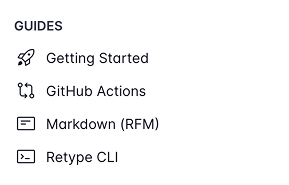
### Modes
| Mode | Description |
|---------|------------------------------------------------------------------------|
| `all` | Show icons for all navigation items (default) |
| `folders` | Show icons only for folder/category items |
| `pages` | Show icons only for page items |
| `top` | Show icons only for top-level pages and folders, hide for nested items |
| `none` | Hide all navigation icons for a clean, minimal look |
This is particularly useful for documentation sites that prefer a cleaner, text-focused navigation.
---
## Dark or Light scheme
Set your project's default color scheme with the new `scheme` configuration. See [docs](/configuration/project.md#scheme).
!!!
This feature is a [!badge Pro|info] only feature and a Retype [key](/pro/pro.md) is required to enable.
!!!
The `scheme` configuration allows you to control the default color mode (**light** or **dark**) for your Retype generated website. By default, Retype will automatically match the visitor's system preference, but now you can explicitly set the site to start in either `dark` or `light` mode.
Add the following to your `retype.yml` file:
```yaml
scheme:
mode: dark # Options: system, dark, light
```
Mode | Description
-- | --
`system` | (default) Automatically start using the visitor's system color scheme preference.
`dark` | Start in dark mode.
`light` | Start in light mode.
The new `scheme` setting gives you control over the initial appearance while still allowing users to switch themes to match their preference.
---
## Migration made easy
With universal [callout](/components/callout.md) syntax support, migrating from other documentation platforms is now seamless. Whether you're upgrading from Notion, GitHub, Obsidian, or any other platform, your existing callouts will work immediately in Retype.
The enhanced image syntax and print support make Retype suitable for both digital and print documentation workflows, while the navigation customization options let you create the exact look you want.
---
## Write On!
This release represents a major step forward in making Retype the most compatible and feature-rich documentation platform available. We're continuing to expand platform compatibility and add new features based on your feedback.
Try out `v3.9` and experiment with the new features, then let us know what you think on [X](https://x.com/retypeapp) or by opening a GitHub [Issue](https://github.com/retypeapp/retype/issues). Your input helps shape the future of Retype.
---